
How to design a custom phone case
Designing a custom phone case takes three steps: choose your exact phone model, pick a case type, and design the case with your photo, a background color and an optional line of text. The preview shows the camera opening of your phone, so what you see is what gets printed. This guide walks through each step and the details that make a case look good.
Step 1: Choose your exact model
Every case is made for one phone model. "iPhone 17" and "iPhone 17 Pro Max" are different cases, and so are Galaxy S25 and S25 Ultra, or Pixel 10 and Pixel 10 Pro XL. The size, the buttons and the camera opening all change.
- iPhone: Settings, General, About.
- Android: Settings, About phone.
Use the brand filter in the first step to find your phone quickly. If the case is a gift, ask or check the box: the wrong model is the most common reason a case does not fit.
Step 2: Choose a case type
Each model lists the case types it can have: Tough, Snap, Clear, and on selected models MagSafe Tough and MagSafe Clear. The second step shows how the chosen case is built.
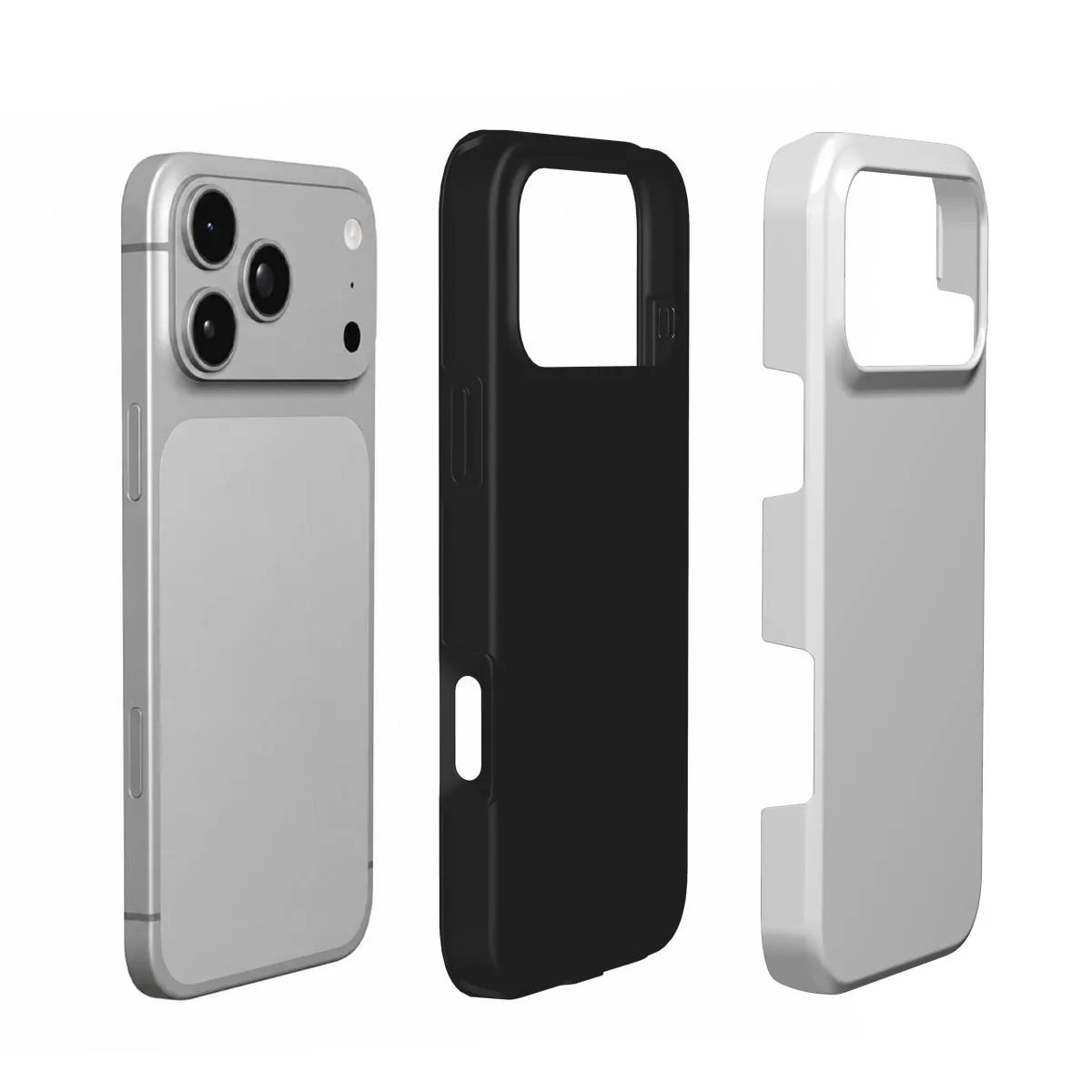
- Tough for everyday protection.
- Snap for a thin, light case.
- Clear to show the phone's color around the print.
- MagSafe Tough or MagSafe Clear for magnetic chargers and accessories.
For a full comparison, read choose a phone case material.
Step 3: Design
Tap the case to add your photo. It stays on your device while you design and is uploaded only when you add the case to your cart. The design step then has three tools:
- Photo: add or change the photo, and pick a background color. The color shows wherever the photo does not cover the case, and a case in just a color, with or without a name, is fine too.
- Transform: opens as soon as you add a photo. Drag the photo with a finger or the mouse, pinch with two fingers or scroll to zoom, and rotate it in small steps. The faded part outside the case is the photo that will not be printed, so you can see how much is left over.
- Text: add a short line, choose a style, size and color, and drag the words where you want them.
Undo takes back the last change, and Start over clears the design. Want several photos? Make a collage in your phone's photo app, save it as one picture and upload that.
Getting the photo right
Before you choose: a sharp original
Whatever the subject, the photo has to be sharp at full size. The back of a phone is much larger than a thumbnail, and every soft edge shows. Three quick checks help:
- Use the original file from your camera roll, not a screenshot, a social-media download or a photo sent through a messaging app. Those are compressed and lose detail.
- Zoom in on your screen. If the eyes or the edges look soft when you zoom in, they will look soft on the case.
- Prefer daylight. Photos taken in good light have less grain and truer colors than evening shots.
Leave the edges and the camera alone
The camera opening and the outer rim are where detail gets cut. Put faces, pets and words in the middle of the back, with some space around them. Leave the area under the camera to background such as sky or a wall.
Think tall
The back of a phone is about twice as tall as it is wide. Portrait photos fit naturally. A wide photo loses its sides, so zoom and drag it until the part that matters fills the case.
Getting the text right
- Short: a name, a date or two words read better than a sentence.
- Contrast: light letters on a dark area, dark letters on a light area.
- Placement: on a calm part of the photo, away from the camera opening and the rim.
- Spelling: read it twice. The case is made with exactly the words in the preview.
Check before you order
Look at the preview at arm's length, as you will see the case in your hand. Add it to your cart when you are happy with it. Can you recognize every face? Is anything important under the camera opening? Is the text spelled correctly and easy to read? If yes, you are ready.
Ideas to start with
Not sure what to put on your case? Our photo guides help with the most popular ideas: dog, cat, couple, family, baby, best friend and travel photo cases.
Ordering and delivery
When the preview looks right, add the case to your cart and pay securely with Stripe, in euros, pounds or dollars. We make and dispatch your case within 2 business days after payment. Delivery then usually takes 5–7 business days within Europe, 5–10 to the United States and up to about 20 to Australia. These are estimates, so leave some room before a birthday or a holiday.
Your case is made for you, so it cannot be returned because the photo, the spelling or the model was wrong. If it arrives damaged or does not match the preview, write to us with the order number and a photo.
Questions
How long does it take to design a custom phone case?
Usually a few minutes: choose the model and the case type, then add your photo, a background color and an optional line of text.
Do my photos get uploaded while I design?
No. Your photos stay on your device while you preview the case.
How many photos can I put on one case?
One picture. To show several, make a collage in your phone's photo app and upload it as one picture.
Can I order a case with just a color and no photo?
Yes. Pick a background color, add a name if you like, and add the case to your cart.
What photo resolution do I need?
Use the original photo from your camera roll. Screenshots and photos from messaging apps are compressed and can print soft.
Can I change my design after ordering?
Write to info@zikvi.com as soon as possible. Once a case is made, it cannot be changed or returned because of the photo, the spelling or the model.